Overview
When working on software projects, fixing bugs is an inevitable fact of life. Sometimes you're lucky and the nature of the issue is obvious, however other times tracking down the source of the issue can be a time consuming and laborious task. If your project is using git for source control, then git bisect can be used to track down the commit that introduced the bug. Hopefully by narrowing the focus of investigation to the changes within a single commit, finding the root cause is significantly easier. This is especially true if commits within your project are small and focused.
Git bisect works on the basis of giving a known bad commit (were the bug is present, such as the current head) and a earlier good commit (were the bug is not present). The command works by switching into a special bisect mode were git will checkout a commit and the user will label that commit as good or bad. Git will then checkout a new commit and the process continues until git has determined the first bad commit. For those interested git uses a binary search of the commits in between the initial good and bad commit. So not every commit in-between the initial starting points will be checked. We enter bisect mode by running the following from the terminal: -
$ git bisect start [bad commit] [good commit]
Once in bisect mode, git will checkout a commit for us that we need to label as either: -
- good – The bug is not present.
- bad – The bug is present.
- skip – It could not be determined if the bug was present, such as the project failed to compile.
$ git bisect good | bad | skip
After labelling the commit git bisect will checkout a new commit and the process continues until the first bad commit is found.
Automating the process
This works, however this requires user interaction to determine if the bug is present within a given commit. Instead let’s consider writing a unit test that will determine that for us. That way we could set the whole process in motion and git bisect could determine the first commit in the range that causes our unit test to fail. Git bisect has a command to run a shell command to automatically label a commit.
$ git bisect run [cmd]
The exit code of the shell command is used to determine the label for the commit.
- Exit Code 0 - good
- Exit Codes 1 through 127, excluding 125 - bad
- Exit Code 125 - skip
Apple has documented the process of running unit tests from the command in
Automating The Test Process using the xcodebuild command. For those interested
Apple's Building from the Command Line with Xcode FAQ is also a good source of information.
The last piece of the puzzle is how to run a unit test that was not part of the project in the past and therefore when git performs a checkout the test will not be present. The simplest method I found was to create a stash of the changes to add the unit test into the project. That way we can apply the stash after each checkout, but before running the tests.
To make running the unit test easier we'll write a shell script to build and run the test target.
You'll notice that the script separates the steps of building the test target from running the unit test. In an ideal world each commit in your project would compile and run. However the reality is that some commits may break the project and fail to build. In these situations we exit the script with status code 125 which git bisect will interpret as the skip command. This will get us to carry on our search, at the cost of potentially making the end result less focused. Additionally the script uses the -only-testing argument to xcodebuild to only run a specific unit test rather than all of them.
Example
If like me you find a worked example easier to digest. Let's use a small, if somewhat contrived example. You'll need to suspend your sense of disbelief here as the source of the bug will be some what obvious. However the aim of the exercise is working with git bisect not fixing this particular issue.
This demo project can be found on GitHub
here. The project is an iOS app, that has a simple slider control for numbers between 0 and 10 and a label that will report the current value as well as the sum and average of all integers between 0 and the current value.
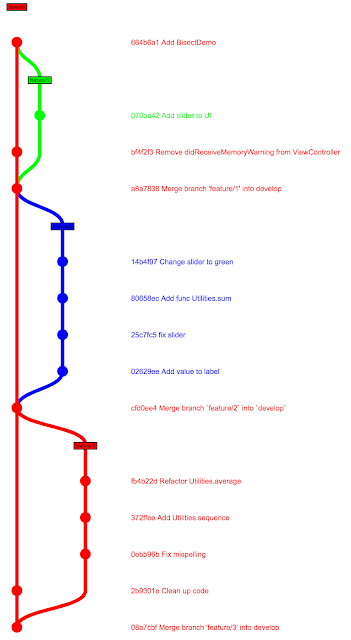
To makes things a little more realistic within the repository I have created a main develop branch and 3 feature branches that are created from develop before being reintegrated.
At some point in the development a bug was introduced such that if the slider is at position zero the app will terminate. This did not occur initially so let's use the technique above to determine the commit that introduced the bug.
We start by writing a unit test that can be run to determine if the bug is present.
Next we stash this change so that it can be applied for each checkout.
$ git stash save "unit test"
We can then start the git bisect session with the given bad and good commits. Then issue the command for git bisect to run the script automatically.
$ git bisect start 08a7cbf 664b6a1
$ git bisect run
./bisect-unittests/BisectDemo/unittest.sh
The process will take off and after awhile the following printed out: -
fb4b22d is the first bad commit
commit fb4b22d
Author: Raymond McCrae
Date: Tue Mar 20 20:06:39 2018 +0000
Refactor Utilities.average
bisect run success
Looking at the commit the following method
was changed to
During the refactor a bug was introduced that an empty array will cause a division by zero causing the crash. It is worth pointing out that despite giving the initial range of commits from the develop branch, the commit git bisect identified is on feature/3 branch. Clearly git bisect will follow all paths in between the initial commits not just a simple straight path along the current branch.
Finally we can leave bisect mode by running: -
$ git bisect reset
Since we have a unit test we can include it with any fix that we make to the code to ensure that this type of bug is not made again.
Conclusion
Git bisect is a powerful tool, especially when combined with automation. It is however more suited to finding regressions were we had a previous good state and now things are broken. I have used unit tests in this post, however it would also possible to you UI automation tests instead.


